Effects
Each channel's chain can hold six effects. They start switched off, and you can drag them into any order. Noise suppression is the only one that adds noticeable delay.
High-pass
Removes everything below the Cutoff frequency (20–1000 Hz, default 80 Hz). Most voices have little energy that low, so on a microphone this mainly removes rumble from traffic, air conditioning, or knocks on the desk or mic stand. It is a good first effect on most microphones.
Noise suppression
Available on microphones and Chat Mix Out. See Noise suppression.
EQ
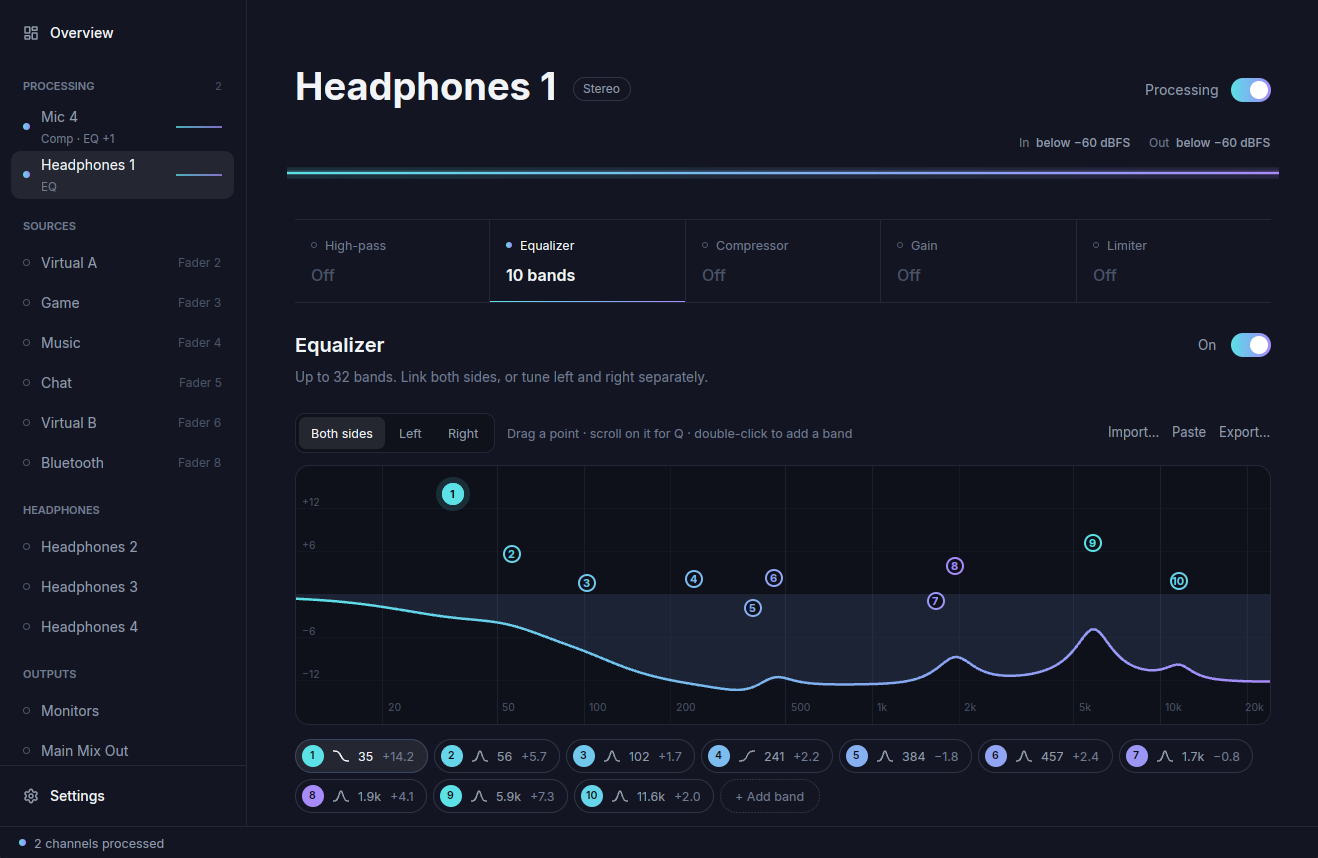
The EQ has up to 32 bands. You can drag points on the curve, scroll on a point to change its Q, and double-click to add a band. Each band's values can also be typed in.
Band settings:
- Type: bell, low shelf, high shelf, low-pass, high-pass, notch, or off.
- Filter design (APO or RLC, next to the type) sets how Q maps to the filter shape. Imported EQ files set it for you.
- Frequency (10–24000 Hz), gain (±36 dB) and Q (band width).
- On disables a band without deleting it.
- Solo plays only the soloed bands, so you can hear what one band does.
Input gain and Output gain (±36 dB) trim the level into and out of the EQ. On stereo channels, Left and Right give each side its own bands, and Both sides links them again.
Typical uses are a gentle cut around 200–400 Hz for a muddy or boomy voice, a narrow cut for a whistle or hum, and an AutoEQ profile on a headphone output.
Compressor
The compressor turns down loud passages so that quiet ones stay audible.
| Control | What it does | Range | Default |
|---|---|---|---|
| Threshold | Level where compression starts | −60 to 0 dB | −18 dB |
| Ratio | Amount of gain reduction above the threshold | 1 to 20 | 3 |
| Attack | Time to react to a rise in level | 0.1 to 200 ms | 10 ms |
| Release | Time to recover after the level drops | 10 to 2000 ms | 120 ms |
| Makeup | Gain added after compression | 0 to 24 dB | 0 dB |
Gain
Changes the level by −60 to +12 dB.
Limiter
Holds peaks below the Ceiling (−24 to 0 dBFS, default −1 dBFS) and recovers over the Release time (10–2000 ms, default 100 ms). Put it last in the chain to prevent clipping.
The limiter works on sample peaks. Lossy encoding such as MP3 can produce inter-sample peaks above the ceiling, so leave some extra headroom for recordings that will be encoded.